
Table of Contents
NNTP pipelining is a performance feature that allows a newsreader to send multiple requests to a Usenet server without waiting for each response before sending the next one. By reducing the idle time between requests, the connection stays active and transfers articles more efficiently.
Newshosting supports NNTP pipelining across its global Usenet server network. This allows users to extract maximum speed and reliability from the Usenet network. The result is faster transfers, smoother automation, and efficient bandwidth utilization across every region, powered by infrastructure designed for speed, reliability, article completion, and redundancy.
This guide explains how NNTP pipelining works, when it provides the most noticeable improvements, and how to enable it in SABnzbd.
What Is NNTP Pipelining?
NNTP pipelining optimizes how newsreaders retrieve articles from Usenet servers.
Normally, a newsreader uses a “stop-and-wait” approach: it requests an article, waits for the server to send it, and only then requests the next one. These tiny pauses add up to significant idle time.
NNTP pipelining allows the newsreader to send multiple requests in a single batch without waiting for individual responses. The server processes the queue and streams the data continuously, filling the gaps that usually slow down a connection.
How NNTP Pipelining Works
To understand pipelining, it helps to look at how article retrieval normally happens.
Traditional Request Flow
Without pipelining:
- The newsreader sends a request for an article.
- The server receives the request and sends a response.
- The newsreader waits for that response to complete.
- Only then does it send the next request.
Even if that delay is only a few milliseconds, it occurs thousands of times during large transfers.
Pipelined Request Flow
With NNTP pipelining enabled:
- The newsreader sends several article requests back-to-back.
- The server queues those requests.
- The server begins sending article data continuously.
- The connection stays active without waiting between commands.
Instead of stopping after every request, the data stream remains active, which improves overall efficiency.
Real-World Performance: When Pipelining Boosts Speed

Pipelining doesn’t increase your raw bandwidth, but it ensures you are using 100% of what is available. Internal testing shows that the benefits are most dramatic when latency (ping) is high or when using fewer simultaneous connections.
Example Performance Results
| Network Condition | 1 Connection | 10 Connections | 25 Connections |
|---|---|---|---|
| 63 ms RTT (US Domestic) | +61.6% Speed | +42.6% Speed | +27.2% Speed |
| 143 ms RTT (Trans-Atlantic) | +108% Speed | +68.9% Speed | +30.6% Speed |
Key Takeaway: If you are already saturating your bandwidth with 50+ connections, you may see minimal gains. However, if you are connecting across continents or prefer using fewer connections to save system resources, pipelining is a game-changer.
When Pipelining Provides the Most Benefit
Higher-Latency Connections
If the connection between the newsreader and the Usenet server has noticeable latency, pipelining reduces the time spent waiting between requests.
This commonly applies when connecting across continents or through networks with longer routing paths.
Lower Connection Counts
Some users run fewer simultaneous connections, either by preference or due to plan limits. In these cases, pipelining helps each connection stay productive instead of pausing between requests. More connections do not always increase speed, and once bandwidth is saturated, a smaller number of well-utilized connections can perform better.
Cloud or Remote Systems
Systems in cloud or remote environments often have lower latency to Usenet servers due to optimized routing and data center proximity. In these cases, pipelining may provide a smaller benefit, but it can still improve efficiency when using fewer connections or when latency increases during peak network conditions.
When the Benefit Is Smaller
In many modern setups, users run multiple connections that already fill their available bandwidth.
When bandwidth is fully utilized, pipelining has less room to improve performance because the connection is already operating at maximum capacity.
In those situations, enabling pipelining may still improve efficiency slightly, but the change may be difficult to notice.
The key takeaway is simple:
NNTP pipelining can provide meaningful speed improvements in higher-latency scenarios or with lower connection counts, but benefits decrease once bandwidth is already fully utilized.
How to Enable NNTP Pipelining in SABnzbd
SABnzbd includes support for NNTP pipelining through its server configuration settings.
Follow these steps to enable it.
Step 1: Open SABnzbd Settings
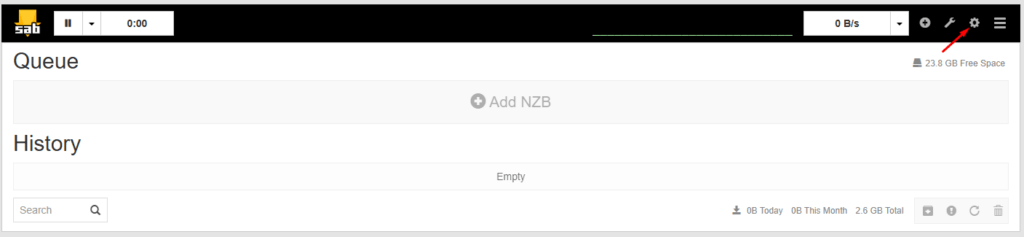
- Open the SABnzbd Web interface.
- Click the gear icon in the top right corner to enter the Settings menu.
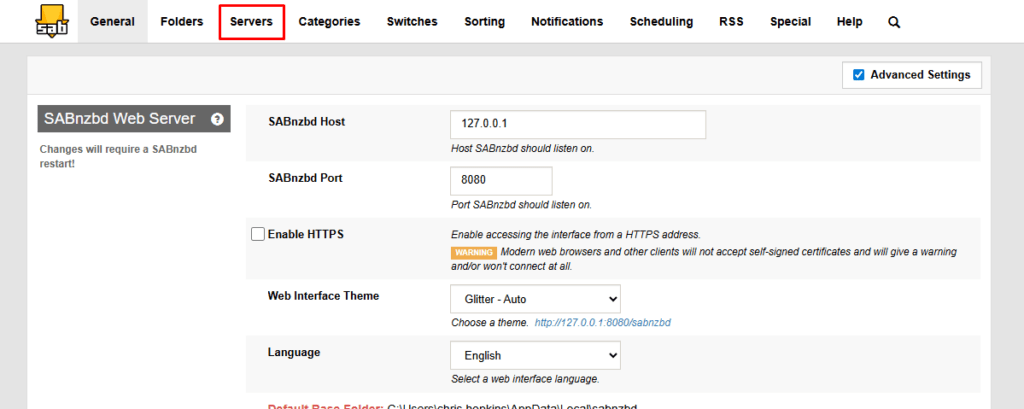
- Select the Servers tab.
Step 2: Edit Your Usenet Server
- Locate your configured Usenet server in the server list.
- Click the Show Details button next to that server.

Step 3: Enable Pipelining
- Find the Articles per request option.
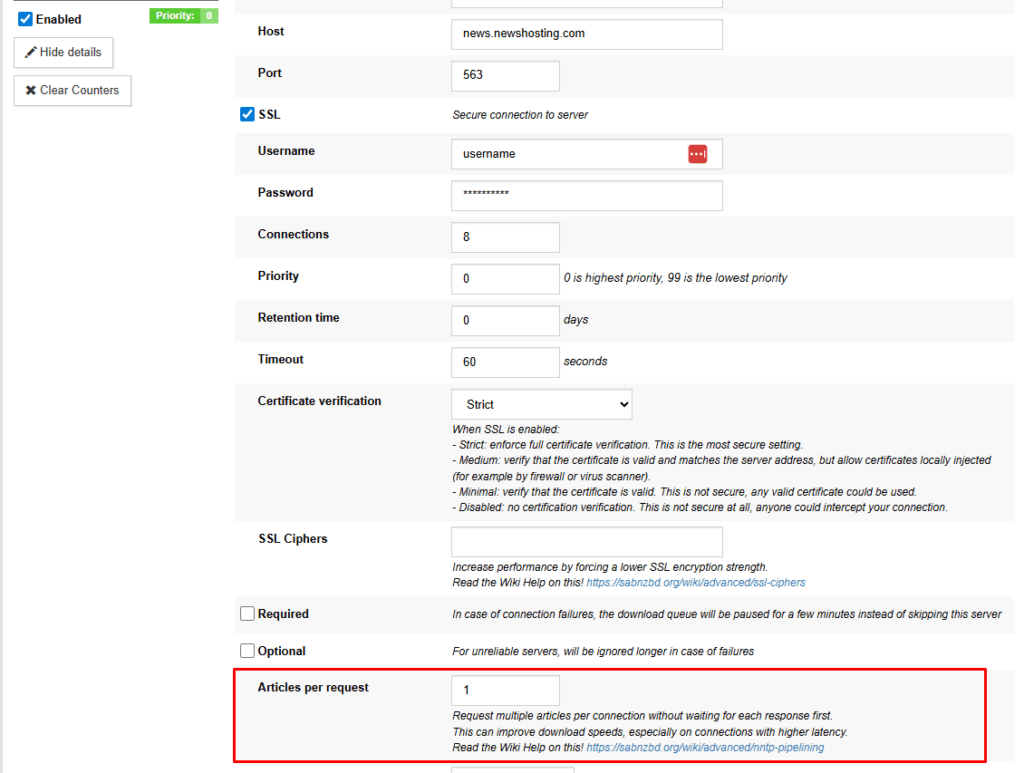
- Enter the number of articles SABnzbd should request at once.
- Adjust this value as needed to find the best performance for your system and connection.
- Click the Save Changes button.
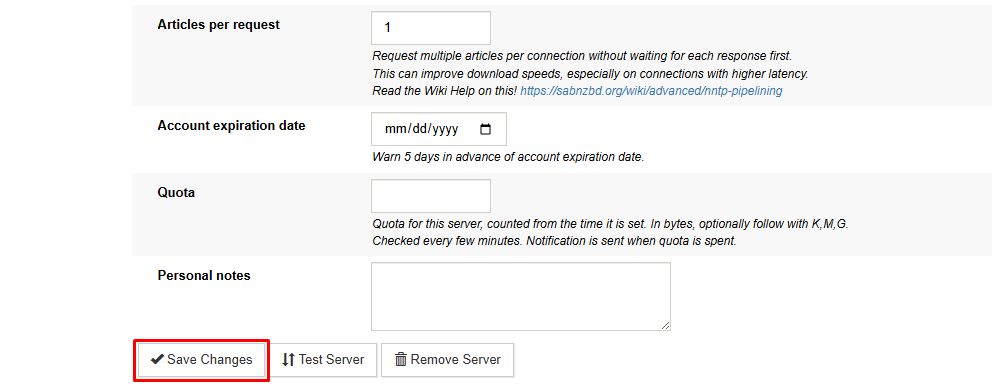
SABnzbd will begin sending multiple article requests in sequence instead of waiting for each response individually.
Testing Performance With Pipelining
After enabling pipelining, it is helpful to observe how it affects your connection.
A simple approach is to monitor transfer speeds while the Articles per request option is set to “1” and compare performance with higher numbers.
Because each network environment is different, results may vary depending on latency, bandwidth, and connection count.
Why Use Pipelining on the Newshosting Network?
Not every Usenet provider supports pipelining. It requires robust server infrastructure designed to handle queued requests without dropping article completion rates.
Newshosting’s global backbone is built for this level of efficiency. By combining NNTP pipelining with Newshosting’s industry-leading retention and completion, you ensure your automation is smoother and your downloads are as fast as your ISP allows.